If you use an online booking tool as a service provider, you probably know the situation: you share the booking link on Facebook, by email, on Instagram — yet some of your guests still call, because they can't find the booking option on your website. They might even message you on Messenger asking "When do you have a free slot?" — while your calendar is right there, just not where they're looking for it.
The statistics confirm this: providers who offer the booking option on their own website typically 30-50% more online bookings than those who only share an external link. The reason is simple: the fewer steps to booking, the more people complete it.
The solution: embed the booking widget directly on your own website. Így a látogatók ott foglalnak időpontot, ahol épp böngésznek — nem kell másik oldalra küldened őket, és nem veszíted el őket útközben.
Why is an embedded widget better than an external link?
An external booking link works perfectly, but it has a few drawbacks:
- You lose the visitor. Every click that takes someone away from your website is a chance for drop-off. An unfamiliar domain further reduces trust.
- It doesn't fit the design. The external booking page has its own style, which may differ from your website's branding — the guest feels like they've "left" somewhere else.
- Bounce rate increases. If a visitor leaves your page, they're less likely to come back. It's not ideal for SEO either.
The embedded widget solves these: the guest stays on your own website throughout, the booking interface blends seamlessly into the design, and the entire process starts with a single click.
How does the AI Booking booking widget work?
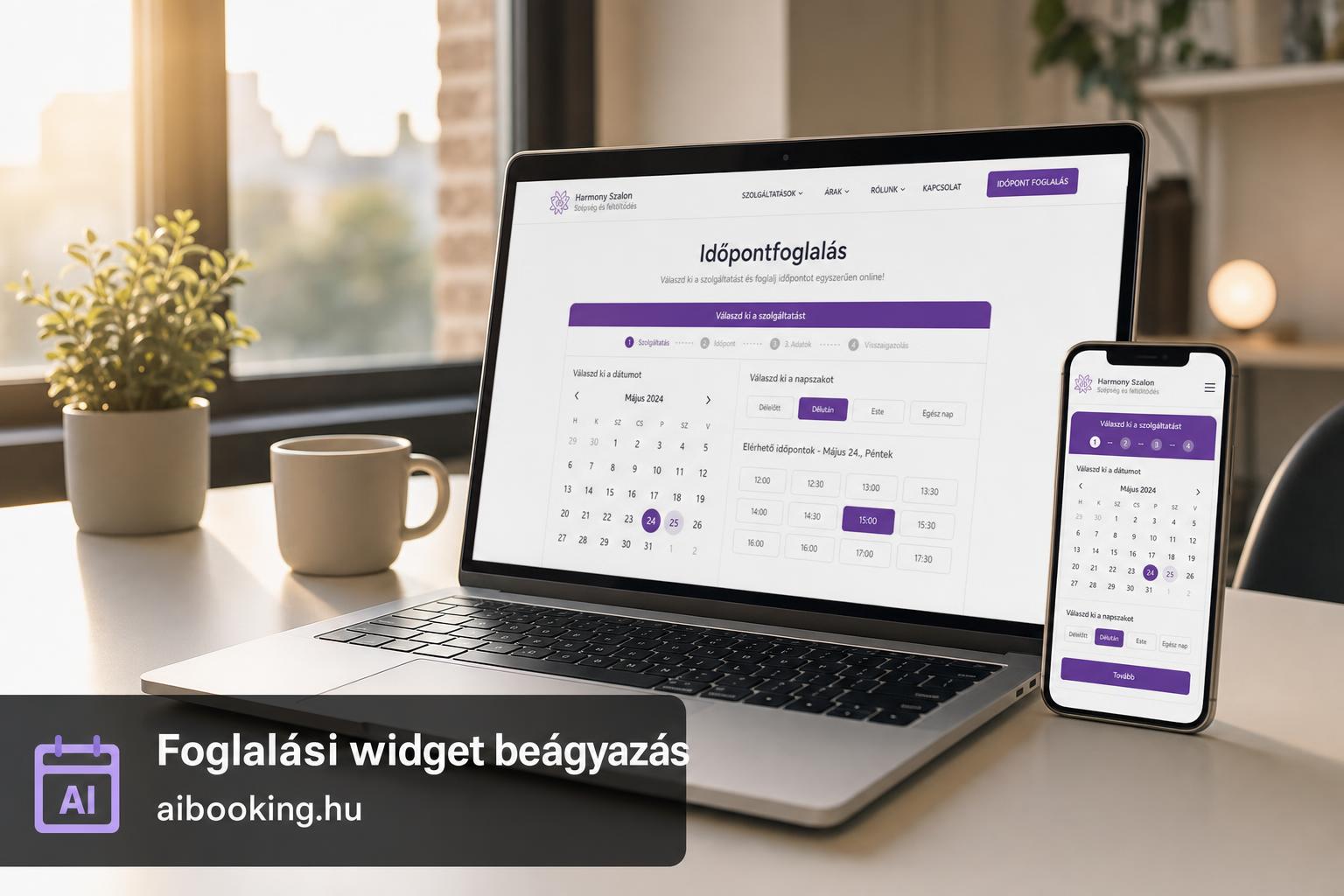
The AI Booking widget is a short snippet of code you insert into your website's source. The widget automatically loads your services, your available time slots and the booking form — all within your page.
From the guest's perspective, the process looks like this:
- Opens your website and clicks on the Booking to the menu item.
- They select the service (for example Women's haircut + blow-dry or Relaxation massage, 60 minutes).
- Selects a free time slot from the calendar.
- They provide their name, phone number and email address.
- They immediately receive a confirmation email — and you see the new booking in your calendar.
All of this without visitors ever leaving your site. The automatic reminders and the Google Calendar sync it works in the background — no extra work for you.
Embedding on a WordPress site — step by step
WordPress is the most popular website builder in Hungary, so AI Booking makes embedding on this platform particularly easy.
- Copy the embed code from the AI Booking admin interface. The Settings you'll find the widget code snippet in the menu.
- Create a new page in WordPress (e.g. "Appointment Booking" or "Online Booking").
- Add a "Custom HTML" block (in the Gutenberg editor) or an "HTML" widget (in Elementor), and paste in the code.
- Save it and check the preview — the booking interface appears instantly.
- Add it to the main menu — a Appearance → Menus add the new page there so guests find it right away.
The widget is responsive: it automatically adapts to screen size, so it works great on mobile too. It's worth testing, since most guests now book from their phones.
Embedding on other websites
Not using WordPress? The AI Booking widget can be embedded on any website where you can edit HTML code — be it Wix, Squarespace, Webflow, or a fully custom build.
The principle is the same everywhere:
- Copy the embed code from the admin interface.
- Find the following in your website editor "HTML embed", "Code block" or "Embed" option.
- Paste in the code and save it.
The code is a <iframe> or <script> tag that loads the entire booking interface. No coding knowledge required — once you insert it, it automatically updates whenever you add a new service or change your available times.
Sharing your booking link on social media
Besides widget embedding, AI Booking also offers a direct booking link also gives you something you can share anywhere:
- Instagram bio — put it in your profile link with the text "Book an appointment!" If you use Linktree, add a separate button.
- Facebook page — use the "Booking" button feature and enter your booking link as the URL.
- Email signature — add a "Book online →" line to the bottom of your emails. Surprisingly many people click it.
- Google My Business (Google Business) — add your link to the "Booking" URL. This way people can book directly from Google search.
The two work best together: the the widget on your website, a the link on social media and by email. Így minden csatornáról elérhető a foglalás, a vendég pedig ott foglal, ahol épp tartózkodik.
What to watch out for when embedding? — 5 practical tips
1. Place it in a clearly visible location. Have a 'Booking' or 'Book an appointment' menu item in the main menu that leads directly to the widget page. Don't hide it at the bottom of the 'Contact' or 'About' subpage — the guest won't go looking for it.
2. Always test it on mobile. Most of your visitors view your site on their phone. Open it on mobile, try the whole booking flow — is it comfortable to use? Does it display well everywhere?
3. One page, one goal. Don't overload the booking page with other content: long bios, galleries, price lists. The guest went there to book — don't distract them. Having your prices there is of course useful — but a 2000-word text about "My philosophy" is not.
4. Service names should be clear. The guest doesn't know what "Package A" or "Premium service" means. Spell it out clearly: Women's haircut + blow-dry (45 min) — 5,500 Ft. Minél kevesebb kérdés merül fel, annál többen foglalnak.
5. Turn on the reminders. If you've already embedded the widget and bookings are coming in, don't forget to turn on the automatic reminders. Ezzel a no-show arány akár 40-60%-kal csökkenthető.
What changes after embedding? — Measurable results
Widget embedding is not just a convenience feature — it has a measurable business impact. What most providers experience in the first month after embedding:
- Fewer phone calls and messages. Guests book on their own, no need to coordinate. That means 30-60 minutes of administration saved every day.
- More bookings outside business hours. The widget is available around the clock — many guests book around 9-10 pm, when the salon is already closed. Without an online option, these bookings are lost.
- Fewer no-shows. When booking online, the guest provides their email address, so the automatic reminders reach them. With phone bookings, there's often no email — no reminder — no guest.
- A more accurate calendar. Every booking is automatically added to the to Google Calendar, no manual entry, no double booking.
On the statistics tab of the AI Booking admin interface, you can track the number of bookings, the most popular time slots, and the ratio of returning guests — so you can see where and how the widget delivers results.
Frequently asked questions about widget embedding
Can the widget be embedded for free?
Yes. AI Booking's free plan includes the booking page and the embeddable widget — you can use it for free for up to 30 bookings a month.
Does online payment also work within the widget?
Yes. If you enabled the Stripe integration, the guest can also pay or leave a deposit right inside the embedded widget — no need to navigate to an external page.
What happens if I modify my services?
The widget updates automatically. If you add a new service or change the price in the AI Booking admin, it appears on your website immediately — you don't need to touch any code.
Will it slow down my website?
The widget loads asynchronously, so it doesn't slow down the page load. The booking interface only appears when the visitor scrolls to that section.
What's the difference between a booking link and a widget?
The booking link takes the guest to a separate URL (e.g. app.aibooking.hu/foglalj/te-szalonod). The widget, on the other hand, appears on your own website — the guest never leaves your page. Both have their place: the widget for the website, the link for social media and emails.
Do I need a developer for the embedding?
No. Embedding is a simple copy-paste task — if you can edit a page in WordPress, you can do it. If you get stuck, AI Booking's customer support will help you set it up.
Summary
Embedding the booking widget is the easiest way to turn your website visitors into paying guests. No programmer needed, no extra cost (even the free package includes it), and you can set it up in 10 minutes.
The essentials in three points:
- Widget for your website — the guest books right where they're browsing.
- Link to social media — Instagram bio, Facebook button, email signature.
- Reminders enabled — so the guest actually shows up.
If you haven't tried it yet, now is a good time to start:
Try AI Booking
14-day free trial, no credit card required. Embed the booking widget on your website and your guests can book online as early as tomorrow. Hungarian-language interface, Hungarian invoicing, Hungarian customer support.
Start free trial →